Blog, category: Marketing
The website handover checklist: what your client should have on launch day

A website launches and the client is happy. Weeks later the agency is still spending afternoons changing a phone number and re-uploading a logo. Nobody planned for that. The site was finished. The handover wasn’t.
Handover is part of the product. A site your client can understand and edit is cheaper for you to support and easier for them to keep alive.
Run the edit test before you call it done
Give the client’s team this list and watch them do it without help.
- Change the headline on the home page.
- Swap an image.
- Add a team member.
- Publish a blog post or news item.
- Update the phone number everywhere it appears.
If they can’t, the CMS setup, the page structure or the training needs more work. This single test finds most of the problems the rest of the checklist is trying to prevent.
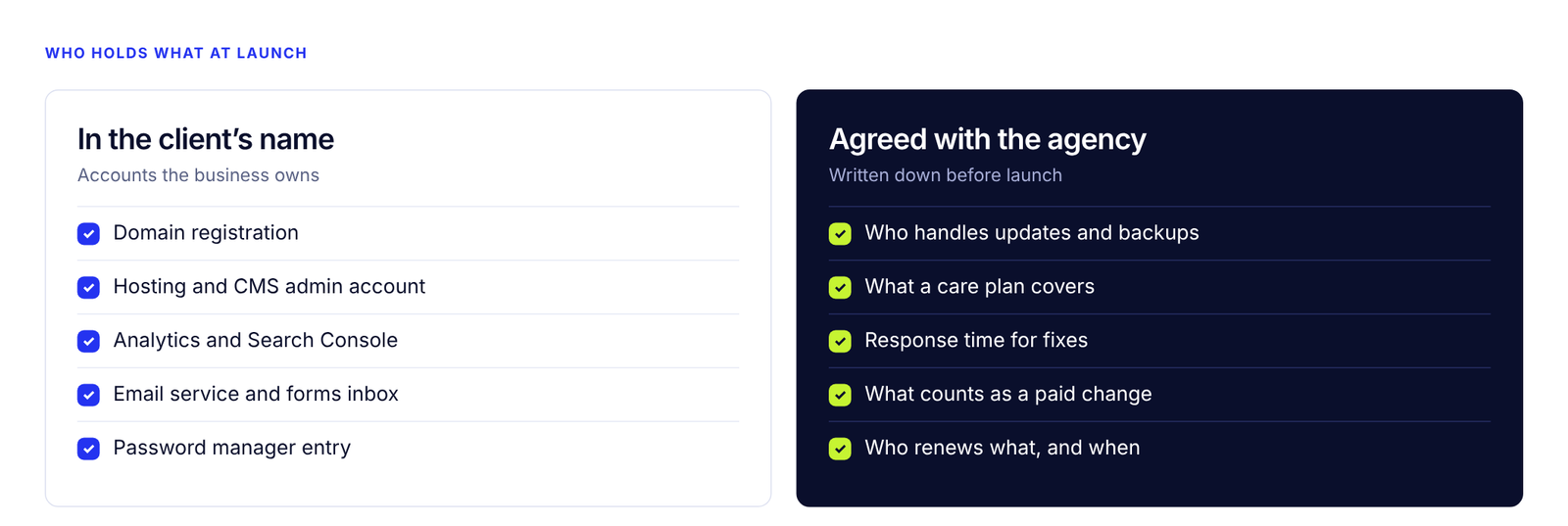
Who holds what at launch
The checklist
Ownership
- Domain registered in the client’s name, or clearly documented if you hold it for them.
- Hosting and CMS accounts under a business email the client controls.
- A written note of who pays for what, and when it renews.
Access
- Admin login for the client, with roles for anyone else who will edit.
- Your agency access removed or reduced to what you’ve agreed to keep.
- Credentials shared through a password manager, never in an email thread.
Safety
- Automatic backups are running, and a restore has been tested once.
- Someone is responsible for updates: you, the host, or a care plan.
- SSL is active and forms are protected against spam.
Measurement
- Analytics and Search Console are connected, with the client as owner.
- Form submissions are tested end to end and land in an inbox someone reads.
- Key actions are tracked: form fills, calls, bookings.
Search and speed
- Page titles and descriptions are written for the main pages.
- Old URLs are redirected if this replaced an existing site.
- Images are compressed and the mobile layout is checked on a real phone.
- The staging copy is blocked from search engines, and the live site is not.
Documentation
- A two-page guide: how to log in, edit a page, add a post, and who to contact.
- A short screen recording (five minutes is enough) of the most common edits.
- A list of plugins or integrations and why each one is there.
Why handovers fail
Handovers rarely fail because of a hard technical problem. They fail for ordinary reasons:
- The builder is the only person who has checked it. Familiarity hides problems. A form that works for the person who built it can still fail for a visitor.
- Accounts were created in the agency’s name “just for now.” Months later nobody remembers who owns the domain, and the client can’t renew it.
- Training is a call, not a record. A one-hour call is forgotten within a week. A short guide and a recording are still there when the new office manager arrives.
- Support boundaries were never written down. The first “quick change” is free, so the tenth is expected to be too.
Each of these is cheap to prevent on launch day and expensive to repair later.
Decide what support looks like
Write down what’s included after launch, what is a paid change, and how quickly you respond. Clients rarely mind paying for changes. They mind not knowing.
| Launch fix window | Care plan | Pay as you go | |
|---|---|---|---|
| What it covers | Bugs and corrections found in the first weeks | Updates, backups, monitoring, a few hours of edits | Individual changes, quoted each time |
| Good for | Every project | Clients who want it kept running | Clients with a technical person in-house |
| Watch out for | Unclear end date | Unlimited “quick edits” | Slow turnaround that frustrates the client |
A simple monthly care plan turns “can you just quickly…” into a predictable line item.
Choose a CMS the client can actually use
The best site builder is the one your client’s team can edit. A visual editor, clearly named sections and a limited number of page templates beat a flexible system that only a developer understands. If every request needs custom code, the build was too fragile for this client.
When a partner helps
Websites are one of the easiest services to over-promise and one of the hardest to hand over well. A delivery partner that builds on a CMS clients can edit, documents the handover, and runs the edit test before delivery gives your agency a finished site and fewer support requests.